Primitive object generation
The Primitive object tool allows you to create, edit, and manage parametric shapes directly within the 3D scene. The Primitive object button is located in the 3D Objects toolbar.
Available Objects
Select any icon from the grid to view and adjust its specific parameters:
| Symbol | Description |
|---|---|
| Sphere | Radius, Theta Resolution, Phi Resolution |
| Circle / Disc | Inner Radius, Outer Radius, Radial Resolution |
| Cylinder | Radius, Height, Resolution |
| Cube | X Length, Y Length, Z Length |
| Point | Radius |
| Plane | X Length, Y Length, Height, Width |
| Triangle | Base, Height, Depth |
| Torus | Ring Radius, Cross-section Radius, Resolution |
| Text | Text String, Depth, Mode (Emboss/Engrave) |
| Hexagon | Radius, Height |
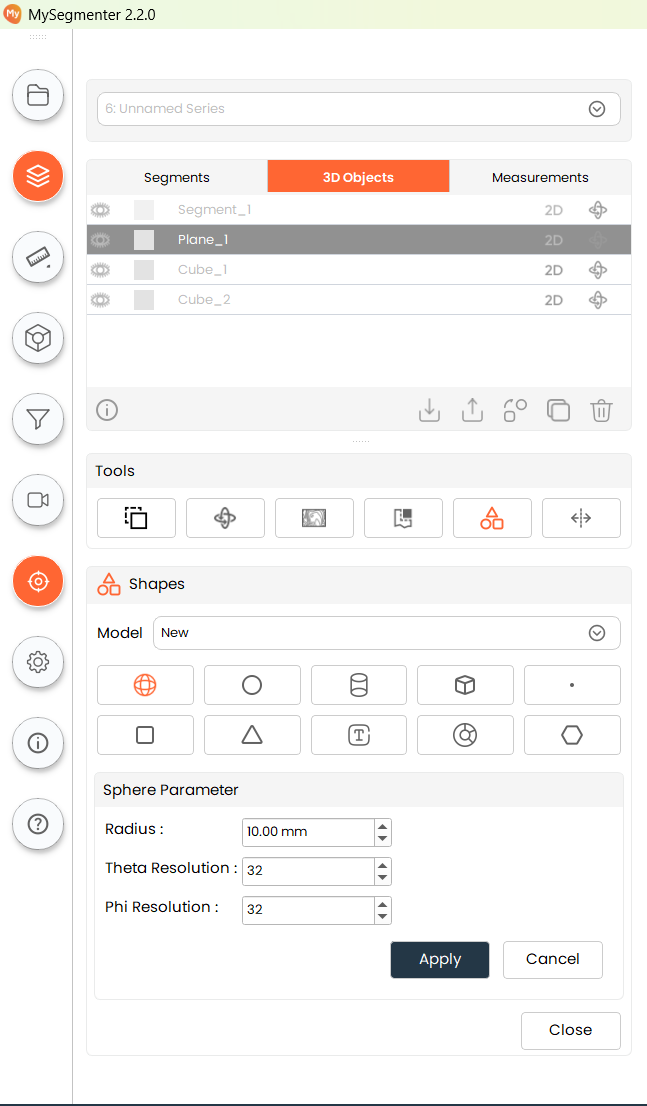
Steps
Creating a New Shape
- Select a Shape: Click the desired icon in the Shapes grid.
- Ensure "New" is selected: In the Model selector dropdown, keep the setting as "New."
- Adjust Parameters: Configure the dimensions and settings for your chosen shape.
- Apply: Click the Apply button.
- Placement: The shape will be placed at the current crosshair location. If the crosshair is disabled, the shape will be placed at the default origin coordinate $(0, 0, 0)$.
Editing an Existing Shape
- Select the Shape: Use the Model selector dropdown to choose an existing shape from the scene.
- Modify: Once selected, the UI will automatically load that shape's current parameters. Update these values as needed.
- Apply: Click Apply to update the geometry. The shape will retain its current position in the scene.